
How Bitrix24 Helps Security Services and Manpower Supply Companies Manage Contracts, Shifts and Deployed Staff in One Platform
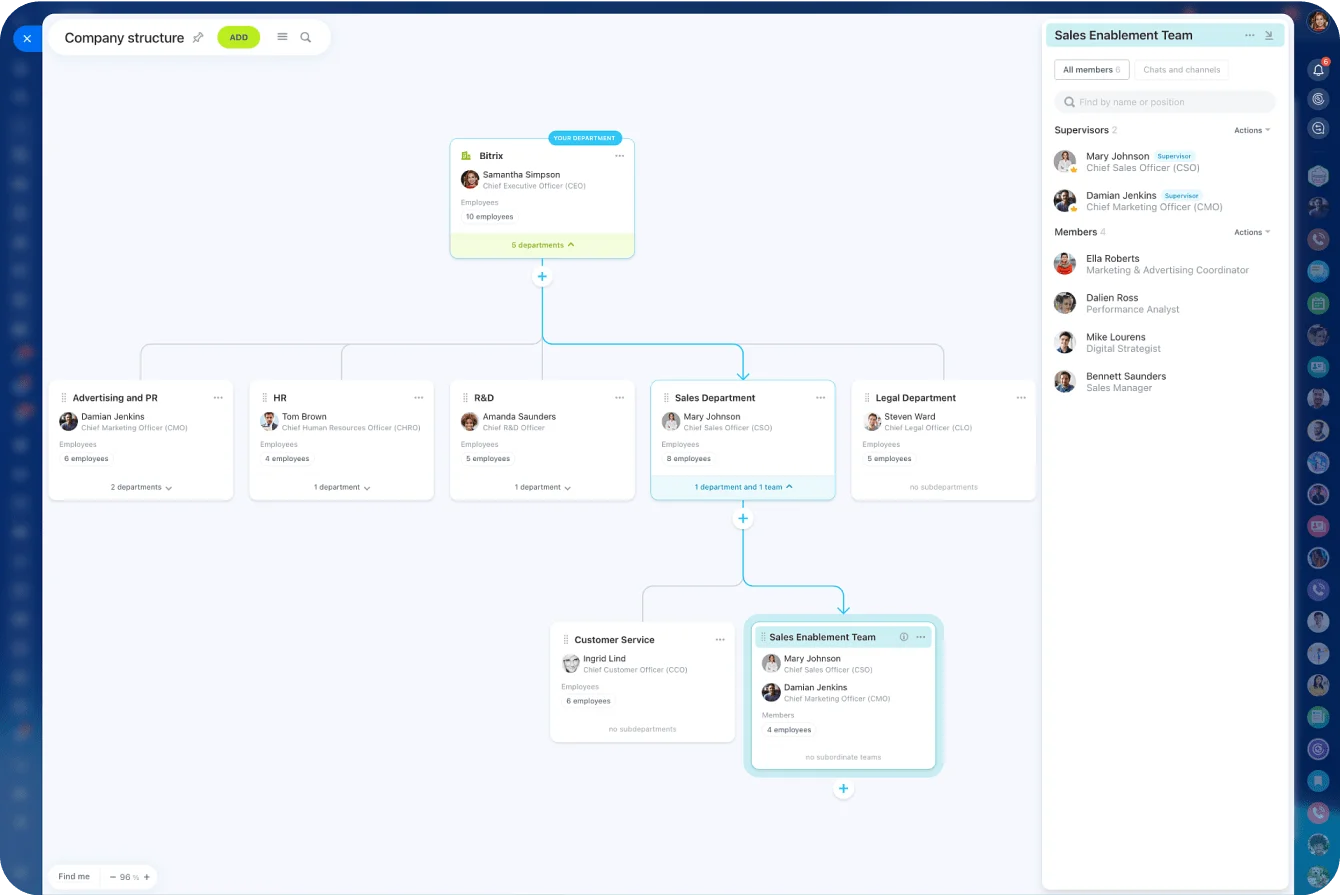
Departments, supervisors and deputies in the Bitrix24 company structure chart · © Bitrix24
A security services or manpower supply company has an unusual shape. The client list is short and slow-moving — a tower, a mall, a logistics yard, a hospital — while the workforce behind it is large, mobile and constantly rotating. One contract might cover four posts, three shifts and thirty people, and the only thing standing between that contract and a penalty clause is whether the right person turned up at the right gate at the right hour.
Most firms in this space run that reality on three unconnected things: a spreadsheet of contracts, a WhatsApp group per site, and a supervisor's memory. It works until somebody resigns, a client asks for last month's attendance, or two sites need cover on the same night. The fix is not more discipline. It is putting contracts, rosters, attendance, approvals and access permissions into one system where each one can see the others.
Contracts and posts as your own record type, not a spreadsheet tab
Bitrix24's Smart Process Automation lets you create your own entity types rather than forcing everything into deals and leads. Bitrix24 describes a smart process as a customisable element in CRM for building your own work scenarios, with examples such as contractor lists, purchase funnels and document registries. You configure the fields, set custom pipelines and Kanban stages, and set default access permissions for each pipeline.
For a manpower firm, that means a "Site Contract" record with its own fields — client, location, headcount required, shift pattern, rate, start and expiry — moving through its own stages. Bitrix24 notes that a smart process can be linked to other CRM entities, calendars and tasks, including task templates, so a contract record can carry its own mobilisation checklist and its own calendar of renewal dates rather than living in someone's head.
Shift schedules and an online time clock
This is where most rosters fall apart, and it is the part Bitrix24 addresses most directly. Its work management page describes work schedules that let you set clock-in and clock-out times, weekly workdays, and break timings and durations — and states plainly that this is especially helpful for teams that work in shifts.
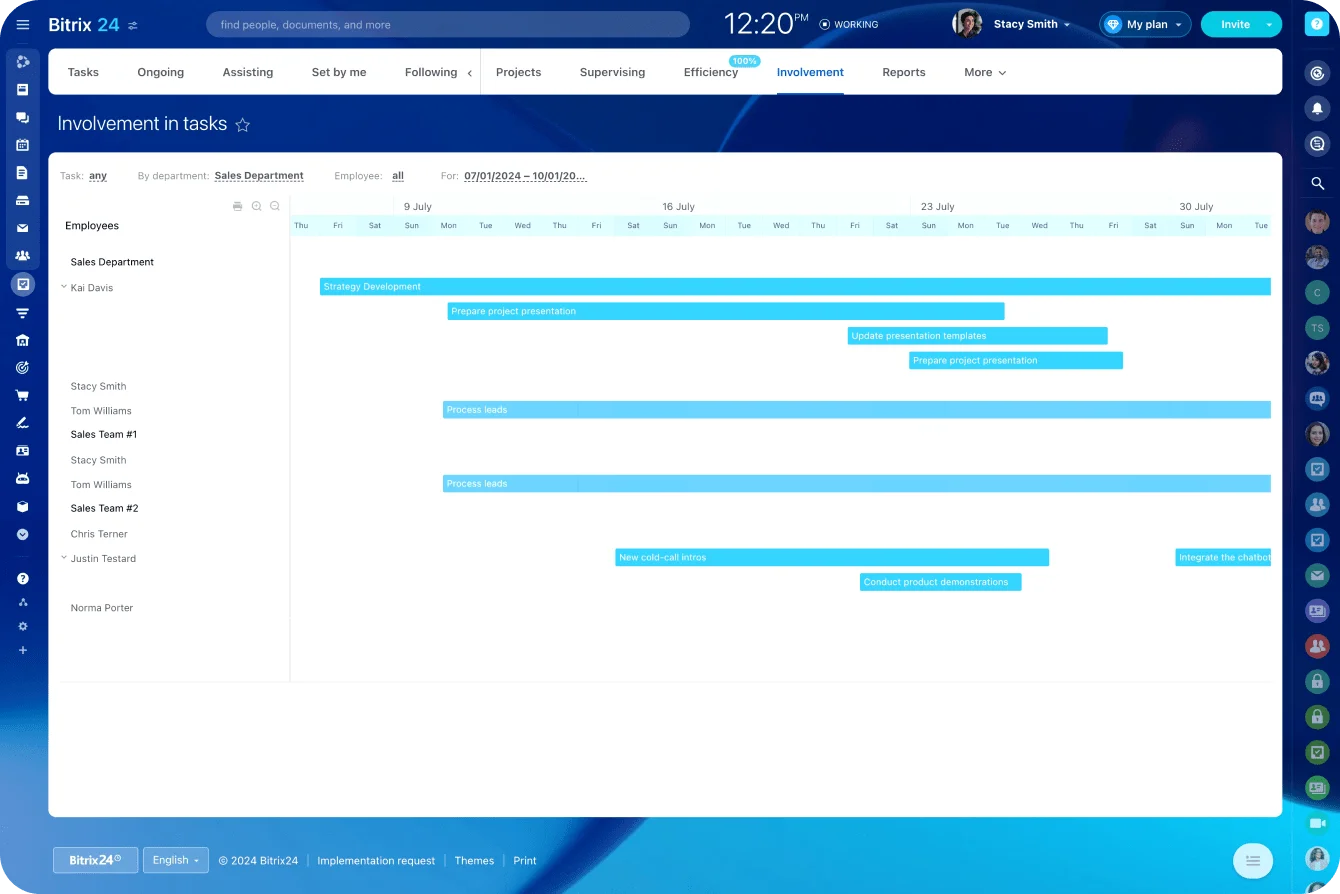
Work schedules, the online time clock and involvement by employee · © Bitrix24
Alongside it sits an online time clock: according to Bitrix24, staff can start, pause and finish their working day from their phones or laptops, and that work time data is aggregated and made available to the supervisor. For a guard at a gate or a technician on a client site, the phone is the only terminal that exists, so a clock that lives in the same app as their chat and their tasks is the one they will actually use. The same section describes a chart of involvement in tasks broken down by employee, so an operations manager can see who is loaded and who is free before promising a client extra cover.
Who is deployed where — and who is allowed to see it
Bitrix24's company structure chart is a visual representation of the hierarchy, with departments and sub-departments, assigned supervisors and their deputies, and the ability to move people from one position to another. Two details matter more than usual in this industry. First, Bitrix24 says parts of the hierarchy can be hidden from public view for security reasons. Second, it says changes to structure automatically reflect across tools like access permissions and reporting lines — and that dismissed employees lose all access.
In a business with high turnover and client sites that are themselves security-sensitive, "the leaver loses access the moment HR marks them as a leaver" is not a nice-to-have. Bitrix24 also describes a centralised, searchable employee directory covering contact details, tasks, calendar, workgroups and drive, which is what a duty manager actually needs at 2am when a post is unmanned and somebody has to be called.
Daily reports a supervisor can accept or decline
Bitrix24 supports daily, weekly and monthly work reports from team members, which a manager can accept or decline, comment on and rate. Reports can be built with a report wizard for specific departments or individuals using custom fields, and a report can be set to repeat automatically on a daily, weekly, monthly or custom cycle.
Translated into site operations, that is the shift handover report, the incident log and the client-facing monthly summary running on the same rails — submitted by the site supervisor, reviewed by operations, scored, and stored where the contract record can point at it. Bitrix24 links the same data to KPI: the more tasks an employee completes on time and without objections, the higher their KPI, viewable by employee and by department.
Approvals that stop living in a WhatsApp group
Bitrix24's Robotic Process Automation is designed for exactly the paperwork this industry generates. Bitrix24 describes RPA as a way to automate standard business processes such as document approval, purchase requests and expense reports, using a no-code workflow editor where you list the stages a document passes through, choose the action and assign the responsible person. Its stated examples include approving a business trip and requesting leave.
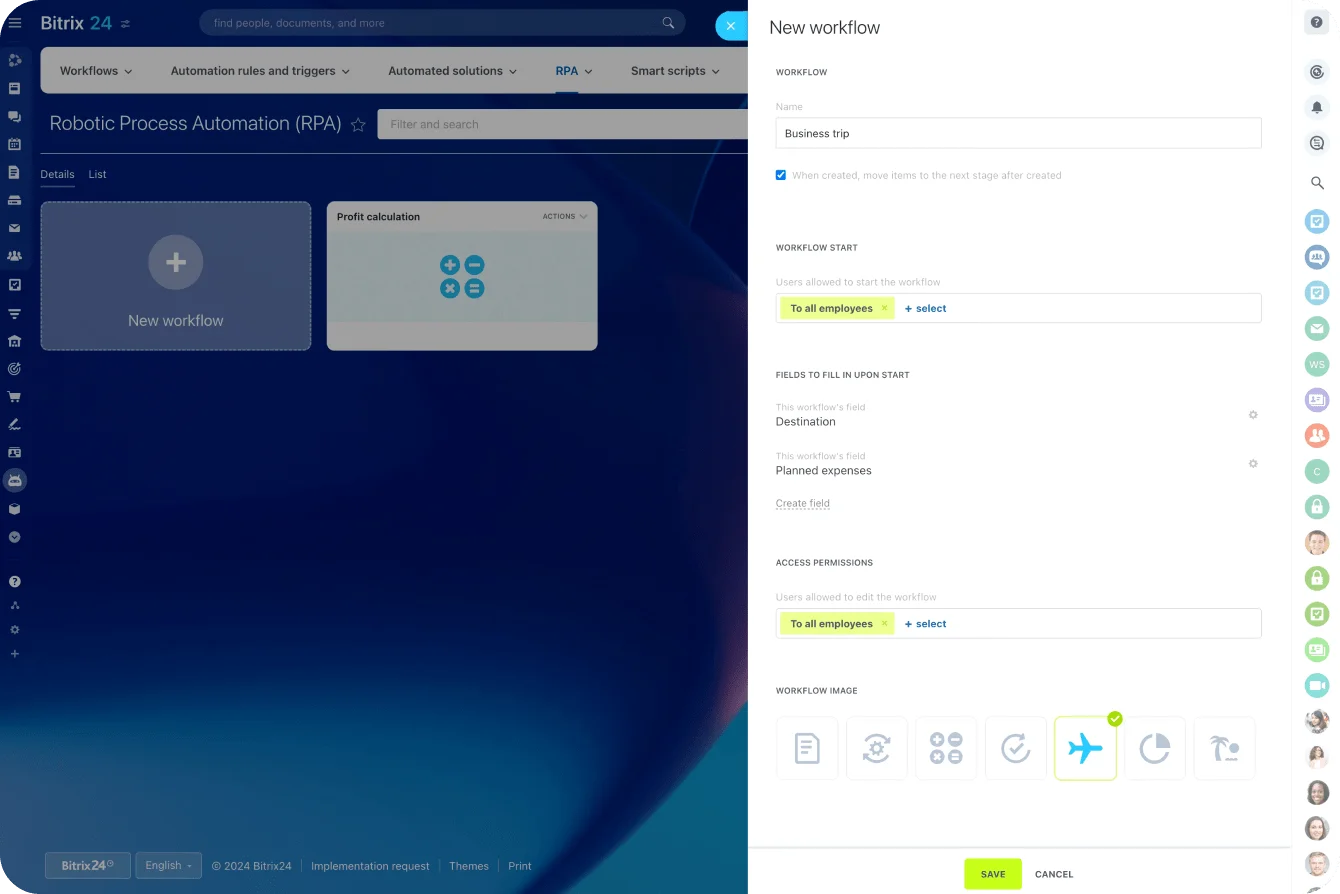
No-code RPA: approval stages, assigned approvers and a single activity dashboard · © Bitrix24
Leave requests, uniform and equipment issue, overtime authorisation, replacement-guard approval — each becomes a short chain with a named approver and a timestamp. Bitrix24 adds that all process-related activity is stored in a single dashboard, so nobody has to open each stage to reconstruct what happened. Separately, its rules and triggers can create tasks automatically when something changes — Bitrix24's own example is a deal moving to the next stage generating a task for an employee — which is how a contract approaching expiry turns into an assigned renewal task instead of a missed date.
One login trail across a large, rotating workforce
Bitrix24 supports adding team members and managing their access through Microsoft Azure Active Directory, with Single Sign-On so employees log in without a password per application, plus SCIM for identity management. It also offers login history: detailed logs of user actions showing where, when and from which device an employee logged in. For a company whose clients audit them on access control, having that trail inside the same system as the rosters is worth more than it sounds.
What it costs, and what it does not do
Bitrix24 states that its plans are a 100% flat fee with no per-user pricing, and that it is free forever for unlimited users, with over 15,000,000 organisations using it worldwide. For a manpower business that may onboard fifty people in a month and release thirty the next, per-seat pricing is the wrong shape, and flat-fee pricing is the single biggest structural argument for the platform here.
Be equally clear about the gaps. The Bitrix24 pages above describe work schedules and a time clock started from a phone or laptop — they do not describe guard-tour checkpoint scanning, geofenced patrol verification or payroll calculation against a client rate card. If your contracts depend on those, plan for a Market app, an integration or a custom build through the REST API rather than assuming they arrive out of the box. Bitrix24 does publish an app marketplace and a REST API for exactly this kind of extension.
Where a partner comes in
None of the above is hard because the features are complicated. It is hard because the decisions are yours to make before anything is switched on: what a "post" is as a record, which fields the rota needs, who approves a replacement guard at midnight, which client gets which report, and what a supervisor is allowed to see about a site that is not theirs. Configure that badly and you get an expensive spreadsheet with notifications.
That is the work we do at B24 Biz Solutions as an official Bitrix24 partner — mapping how your contracts, posts and people actually move, then building the pipelines, schedules, approval workflows and permission structure around it, and training the supervisors who have to live in it every shift.
Sources
- Bitrix24 — Work management: work schedules for shift teams, online time clock, work reports, KPI, involvement chart
- Bitrix24 — Employee management: company structure, supervisors and deputies, access permissions, employee directory, Single Sign-On, login history
- Bitrix24 — Business process automation: RPA approvals, no-code workflow editor, Smart Process Automation, rules and triggers
- Bitrix24 — HR & Automation overview: workflow automation, flat-fee pricing, free plan for unlimited users
- Bitrix24 — Market apps, integrations and REST API
Running a security services or manpower supply company?
We help security firms, manpower suppliers and facilities staffing companies across the UAE, Middle East and South Asia set up Bitrix24 contract and post records, shift schedules with clock-in and clock-out, supervisor-reviewed daily reports, no-code approval workflows and a permission structure that matches who is allowed to see which site — configured around how your operations actually run.
Book a free consultation →